mirror of
https://github.com/jhillyerd/inbucket.git
synced 2025-12-17 09:37:02 +00:00
 698b0406c8
* Add docker build badge
* Rephrase things
* add dev guide link
* Remove brew tap section until #68 is fixed
90 lines
3.3 KiB
Markdown
90 lines
3.3 KiB
Markdown
Inbucket
|
|
=============================================================================
|
|
[][Build Status]
|
|
[][Docker Image]
|
|
|
|
Inbucket is an email testing service; it will accept messages for any email
|
|
address and make them available via web, REST and POP3 interfaces. Once
|
|
compiled, Inbucket does not have any external dependencies - HTTP, SMTP, POP3
|
|
and storage are all built in.
|
|
|
|
A Go client for the REST API is available in
|
|
`github.com/inbucket/inbucket/pkg/rest/client` - [Go API docs]
|
|
|
|
Read more at the [Inbucket Website]
|
|
|
|
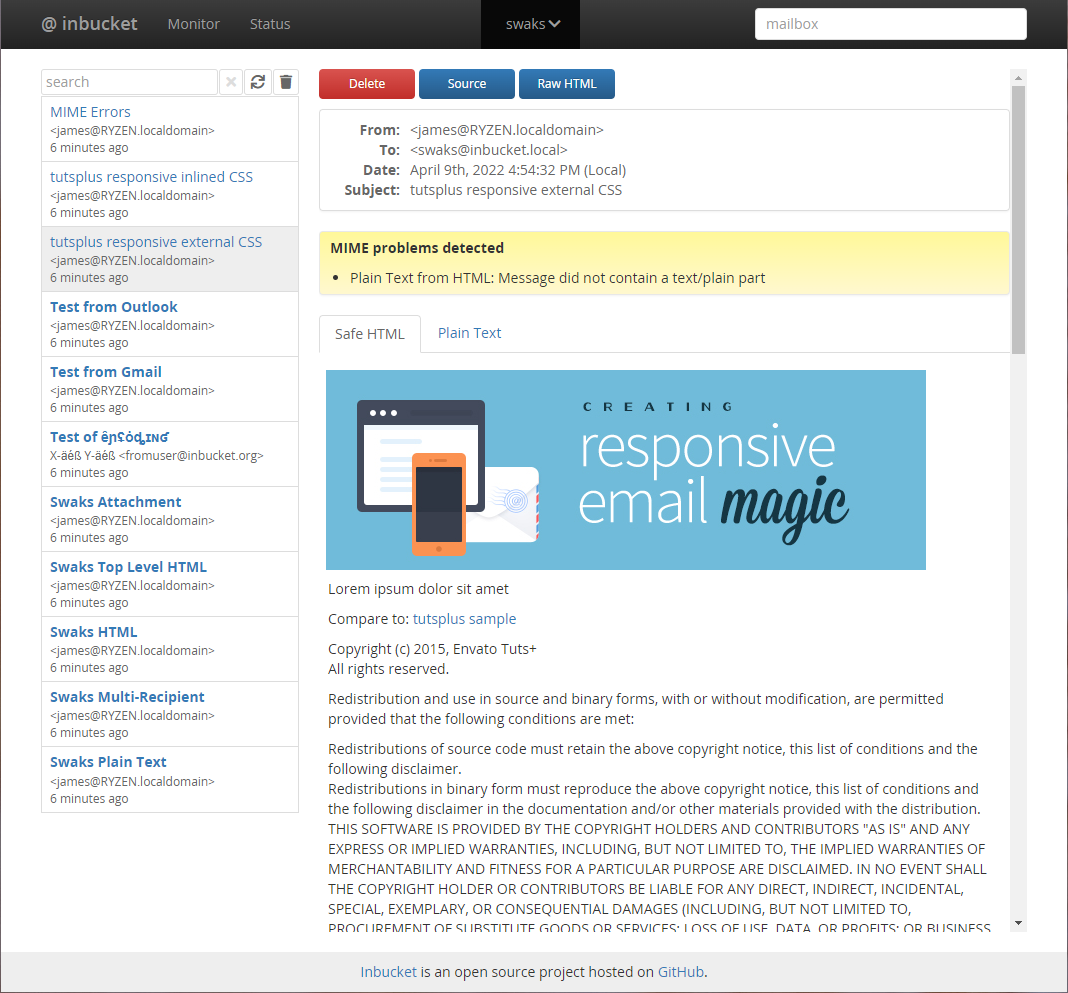
|
|
|
|
|
|
## Development Status
|
|
|
|
Inbucket is currently production quality: it is being used for real work.
|
|
|
|
Please see the [Change Log] and [Issues List] for more details. If you'd like
|
|
to contribute code to the project check out [CONTRIBUTING.md].
|
|
|
|
|
|
## Docker
|
|
|
|
Inbucket has automated [Docker Image] builds via Docker Hub. The `stable` tag
|
|
tracks our `master` branch (releases), `latest` tracks our unstable
|
|
`development` branch.
|
|
|
|
|
|
## Building from Source
|
|
|
|
You will need functioning [Go] and [Node.js] installations for this to work.
|
|
|
|
```sh
|
|
git clone https://github.com/inbucket/inbucket.git
|
|
cd inbucket/ui
|
|
npm ci
|
|
npm run build
|
|
cd ..
|
|
go build ./cmd/inbucket
|
|
```
|
|
|
|
For more information on building and development flows, check out the
|
|
[Development Quickstart] page of our wiki.
|
|
|
|
### Configure and Launch
|
|
|
|
Inbucket reads its configuration from environment variables, but comes with
|
|
reasonable defaults built-in. It should work on most Unix and OS X machines as
|
|
is. Launch the daemon:
|
|
|
|
```sh
|
|
./inbucket
|
|
```
|
|
|
|
By default the SMTP server will be listening on localhost port 2500 and
|
|
the web interface will be available at [localhost:9000](http://localhost:9000/).
|
|
|
|
See doc/[config.md] for more information on configuring Inbucket, but you will
|
|
likely find the [Configurator] tool the easiest way to generate a configuration.
|
|
|
|
|
|
## About
|
|
|
|
Inbucket is written in [Go] and [Elm].
|
|
|
|
Inbucket is open source software released under the MIT License. The latest
|
|
version can be found at https://github.com/inbucket/inbucket
|
|
|
|
[Build Status]: https://travis-ci.org/inbucket/inbucket
|
|
[Change Log]: https://github.com/inbucket/inbucket/blob/master/CHANGELOG.md
|
|
[config.md]: https://github.com/inbucket/inbucket/blob/master/doc/config.md
|
|
[Configurator]: https://www.inbucket.org/configurator/
|
|
[CONTRIBUTING.md]: https://github.com/inbucket/inbucket/blob/develop/CONTRIBUTING.md
|
|
[Development Quickstart]: https://github.com/inbucket/inbucket/wiki/Development-Quickstart
|
|
[Docker Image]: https://www.inbucket.org/binaries/docker.html
|
|
[Elm]: https://elm-lang.org/
|
|
[From Source]: https://www.inbucket.org/installation/from-source.html
|
|
[Go]: https://golang.org/
|
|
[Go API docs]: https://pkg.go.dev/github.com/inbucket/inbucket/pkg/rest/client
|
|
[Homebrew]: http://brew.sh/
|
|
[Homebrew Tap]: https://github.com/inbucket/homebrew-inbucket
|
|
[Inbucket Website]: https://www.inbucket.org/
|
|
[Issues List]: https://github.com/inbucket/inbucket/issues?state=open
|
|
[Node.js]: https://nodejs.org/en/
|